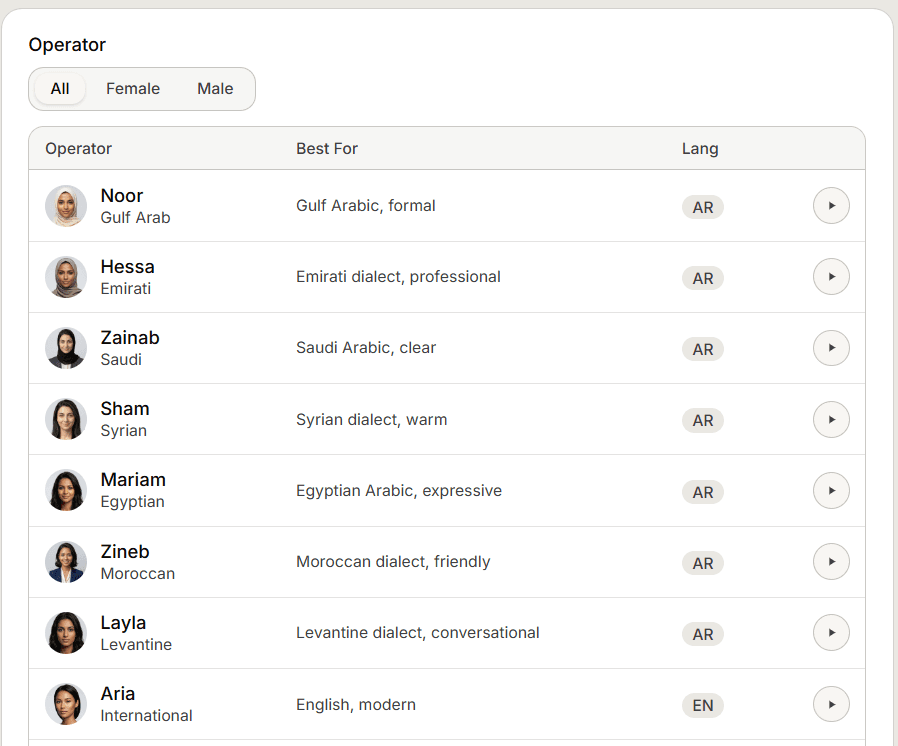
There is no language dropdown on the Voice page. The spoken language and the accent both come from the operator you pick, and nothing else on the page changes them.
The operator carries the language
Each operator is tied to one language, Arabic or English, and one accent within it.
Picking an operator sets that language and accent for every call. There is no separate language field to fill.
Voice supports Arabic and English end to end. Your app may list many languages elsewhere, but voice speaks these two.
Accent is a style, not a promise
The operators labelled by dialect, such as Egyptian, Saudi or Levantine, are styled to sound like that dialect. The wording guides how the agent speaks; treat it as a strong lean toward that accent rather than a guarantee of every phrase.
When a caller speaks another language
Most operators answer in their own language whatever the caller speaks. An Arabic caller who reaches an English operator is answered in English, by design.
The two operators marked International are the exception. They follow the caller and switch to match.
If you expect callers in both Arabic and English, pick an International operator, or point each language at its own number with the matching operator.