
Voice calling lets a visitor talk to your AI agent out loud from inside the chat widget, rather than typing.
Voice is being rolled out gradually, so the call option may not be available in your workspace yet. If you cannot find the settings described here, that is why.
Where visitors find it
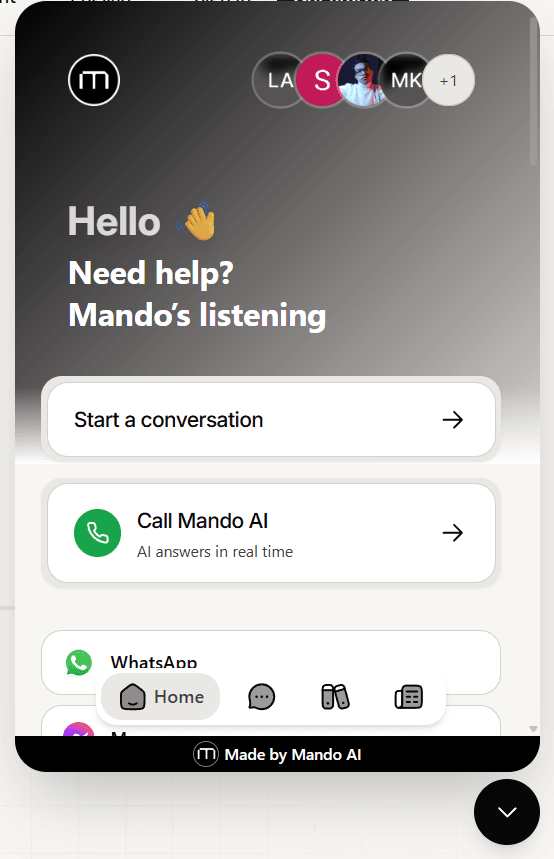
The call option appears on the widget home screen, as a card offering to start a call. A visitor opens the chat and selects it rather than typing a message.
What you need first
Voice enabled for your agent. There is a master voice setting on your agent. With it off, the call option does nothing even if it is visible.
The call entry point shown. A separate widget setting controls whether visitors see the option at all.
Both are on by default, so an agent with voice configured shows the option without extra work.
What the visitor experiences
Selecting the call option opens a call screen. Nothing connects until the visitor presses start, so opening it by accident does not begin a call.
When they start, their browser asks permission to use the microphone. Calls cannot happen without it, so a visitor who declines will not get through.
They end the call from the same screen.
After a call
A conversation that began as a call is kept as a record of that call. The visitor cannot carry on by text in the same conversation, and the chat tells them to start a new one if they have another question.
Worth knowing before you point customers at voice: it is a self contained way to ask something, not a way to open a thread they will continue in writing.
If you embed the widget yourself
If you place the chat widget inside a frame on your own page, that frame has to be allowed to use the microphone or calls will not connect. The standard install script handles this for you.
Frequently asked questions
Do visitors need to install anything?
No. It runs in the browser, and they only need to allow the microphone.
Does a call use my message allowance?
Calls are handled by your voice setup rather than the chat message flow.
Can I turn voice off just on the website?
Yes. Hide the call entry point in your widget settings and voice stays available elsewhere.