
If visitors sign in to your website, you can tell Mando who they are. Your agent then knows their name and details without asking, and their conversations are attached to the right person.
Identify a visitor
After your page knows who is signed in, call:
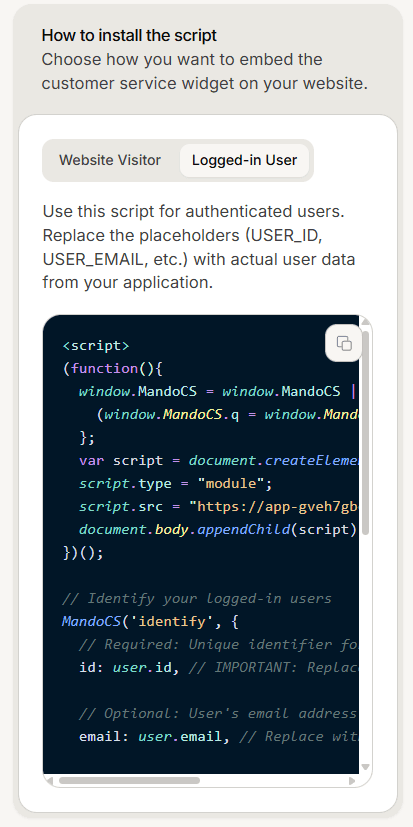
MandoCS('identify', {
  id: user.id,
  email: user.email,
  name: user.name,
  phone: user.phone,
  metadata: {
    plan: user.plan,
    company: user.company
  }
});
Only id is required. Everything else is optional, and metadata takes any extra details you want your team to see.
The dashboard gives you a ready made version of this on the Logged-in User tab of the install card.
Include the email address
This is the single most useful thing on this page.
Passing an id alone is accepted, but a contact record is only created and linked when you also pass an email. If you identify with just an id, nothing errors and nothing appears to be wrong, but the visitor is never connected to a person in your workspace.
So if identify looks like it is doing nothing, check that you are sending an email first.
Clear the identity on sign out
When a visitor signs out, call:
MandoCS('reset');This clears the stored identity and starts a fresh conversation, so the previous chat is no longer reachable from that browser. That is what you want on a shared computer, and it is worth knowing before you call it anywhere else.
Update details later
To add or change extra details after identifying, call MandoCS('updateMetadata', { ... }). It merges with what is already there rather than replacing it.
It only works after a successful identify. Called before one, it does nothing and notes a warning in the browser console.
If identify is not working
Are you sending an email? Without one, no contact is linked. This is the usual answer.
Is there an id? A missing or empty id stops the call, and the browser console says so.
Is your data ready? Calling identify with values that are still undefined sends nothing useful. Call it once your user data has loaded.
Calling identify early is safe in itself. The snippet queues calls made before the widget finishes loading and applies them once it is ready, so timing alone is rarely the problem.
What else you can call
The widget accepts a small set of commands: identify, reset, updateMetadata, open, close and toggle. Both forms work, so MandoCS('open') and MandoCS.open() do the same thing.
There is no command for sending a message on the visitor behalf.
A note on trust
Mando accepts the details your page sends as they are. Only send identity details from pages where you have already checked the visitor is signed in, and never from a page anyone can reach.
Frequently asked questions
Can I open the widget from a link?
Yes. Adding #mandochat to a URL opens it, and #mandochat=your%20text also fills the message box. The text is not sent automatically.
Does reset delete the conversation?
It starts a new one. The old conversation stays in your inbox.
Are there events I can listen for?
The widget signals when it is ready, but there is no general event API.