
A channel is a place your customers message you. Mando connects those places to your AI agent so every conversation lands in one inbox and is answered by the same agent, using the same knowledge.
The channels you can connect
WhatsApp Business for receiving and sending WhatsApp messages.
Facebook Messenger, connected through a Facebook Page.
Instagram direct messages, through an Instagram Business account.
TikTok direct messages.
Email, by forwarding your support inbox to an address Mando gives you.
The chat widget on your website, which is set up separately.
One agent, one inbox
Connecting a channel does not create a second agent. The agent you configured answers on every channel you connect, with the same content, role and instructions. Replies you send by hand go out on whichever channel the customer wrote from.
This is why it is worth getting your agent right before connecting channels: an improvement to its knowledge improves every channel at once.
Where to connect them
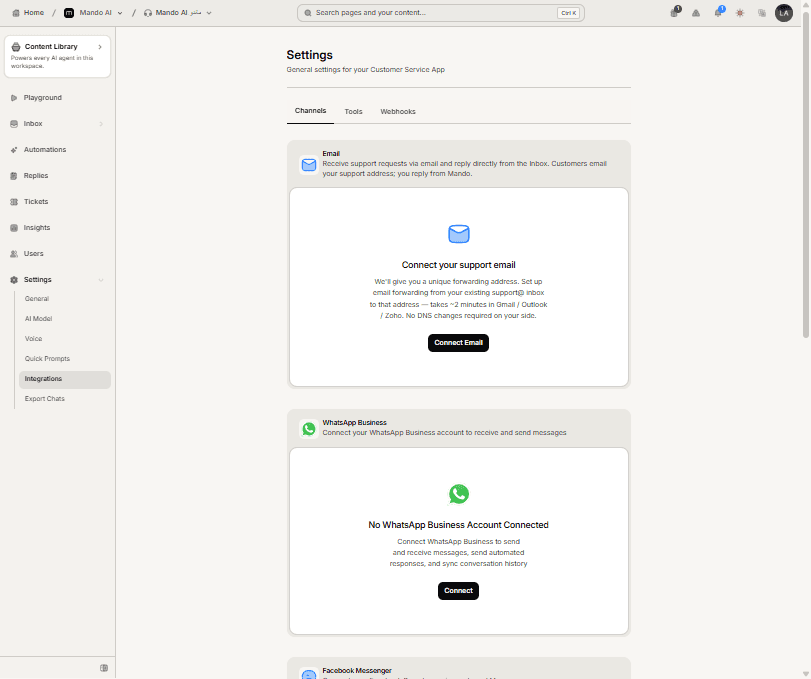
Open your agent, go to Settings, then Integrations and the Channels tab. Each channel has its own card showing whether it is connected, with a Connect or Disconnect action.
Frequently asked questions
Do messages from every channel count toward my plan?
Yes. Messages your agent handles count wherever they arrive from.
Can different channels use different agents?
Channels are connected per agent, so connect a channel to the agent you want answering it.
Does hiding the chat widget disconnect my other channels?
No. The widget visibility toggles only affect your website. Connected channels keep running.