
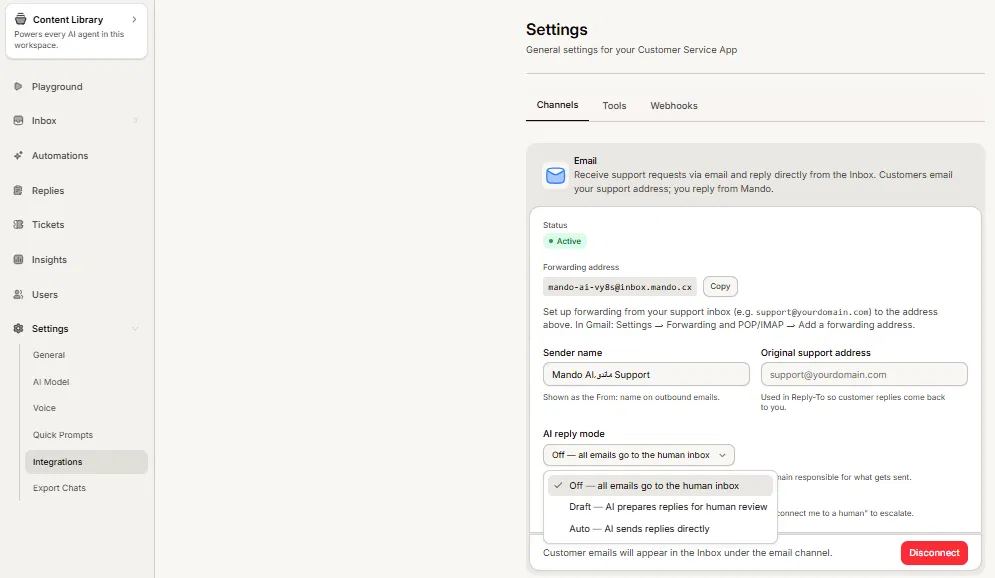
The email channel has three AI reply modes, and the choice decides how much sits between your AI agent and your customer. The default is Off, deliberately.
The three modes
Off: all emails go to the human inbox. Your team writes every reply. This is the default.
Draft: the AI prepares replies for a human to review. Nothing reaches the customer until someone sends it.
Auto: the AI sends replies directly to your customers, without your review.
Steps
Open your agent, go to Settings, then Integrations and Channels.
On the connected Email card, find AI reply mode.
Choose Off, Draft or Auto. Mando asks you to confirm when you choose Auto.
Before you switch on Auto
Auto sends AI-written emails to your customers without anyone reading them first, and you remain responsible for what goes out under your name. Mando asks you to confirm for that reason.
The safer path is to run Draft for a week and read what the AI would have sent. If the drafts are consistently good you have evidence for turning Auto on. If they are not, you have found out privately.
Give customers a way out
There is a related setting worth turning on: a line on AI emails telling customers they can reply asking to talk to a human. It costs you nothing and it stops a customer who needs a person from being stuck in a loop with an agent that cannot help them.
Frequently asked questions
Which mode should I start with?
Off or Draft. Auto is a decision to make with evidence, not a starting point.
Where do drafts appear?
In your inbox with the conversation, ready to review, edit and send.
Can I change modes later?
Yes, at any time. It applies to emails that arrive after the change.