
You create WhatsApp templates on the templates page and submit them to Meta for approval. There are two ways to begin: a one-click quick start, or a template from scratch.
Two ways to start
Use a Quick start to begin from a ready-made example, such as a follow-up, a ticket-resolved note, or an appointment reminder. Each one prefills the form for you to review. Or click New template to start from a blank form.
Fill in the editor
Name: lowercase letters, numbers and underscores only. It cannot be changed later.
Category: Utility or Marketing.
Language: the language of this template.
Header (optional): an image, video or PDF shown above the text. The file you upload is a sample for Meta's review.
Body: your message. Use {{1}}, {{2}} and so on for values you fill in when sending. Up to 1024 characters.
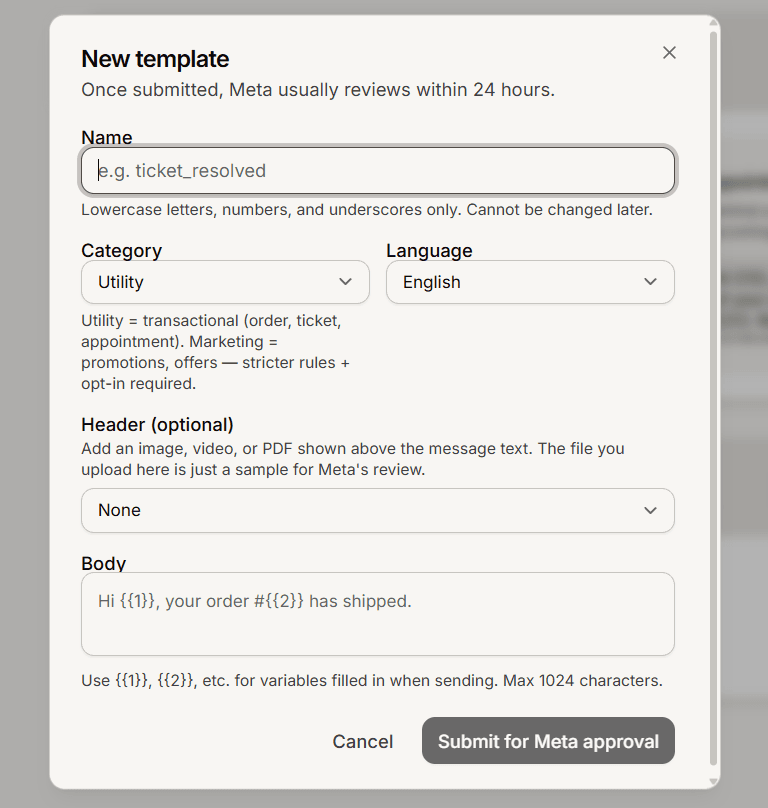
Submit and wait for approval
Click Submit for Meta approval. The template shows Pending review, and Meta usually approves within about 24 hours. Once it is Approved, you can send it from the inbox, in a broadcast, or from a trigger.
You cannot edit a template after creating it. To change one, delete it and create a new one. Meta requires a 24-hour wait before you can reuse a deleted name.
Frequently asked questions
What are {{1}} and {{2}}?
Numbered placeholders you fill in when you send. Only numbered variables are supported.
Can I add buttons or a text header?
This page supports a name, category, language, an optional media header, and the body. For buttons or a text header, create the template in Meta's own manager.
My template was rejected.
Meta returns the reason. Adjust the wording or category and submit a new template.