
To write a procedure in Mando AI, open your AI agent's Automations page, select + Create, then Write a procedure. You name the procedure, say when it starts, and add the steps in the order the AI agent should follow them. A saved procedure stays off until you switch it on.
Before you start
- Procedures are part of the Business, Scale and Enterprise plans and of every free trial. See Compare Mando AI plans: Light, Growth, Business and Scale.
- Note the conversation you want to cover: what the AI agent should say, what it should ask for, and where the details should go.
Steps
- Open your AI agent and go to Automations.
- Select + Create, then Write a procedure.
- Type a name for the procedure in the box at the top.
- Under When to use, choose how the procedure starts and where it runs. How to turn on a procedure for your AI agent explains each choice.
- Under Steps, select Add a step and pick a step from the menu.
- Fill in the step. For a Say step, type what to tell the customer. For an Ask for step, select + Add value and name each value to ask for.
- Add the next steps the same way. Use the arrows on a step to move it up or down, and the bin to remove it.
- Select Save.
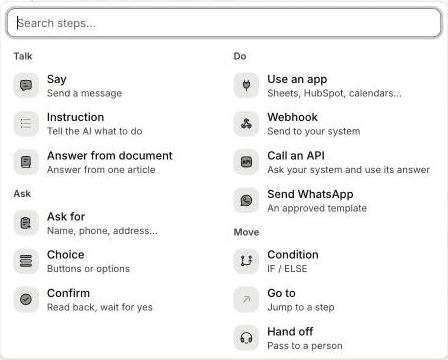
Which step does what?
| Step | What it does |
|---|---|
| Say | Sends a message. Turn on Word for word to send your text exactly as written. With it off, the AI agent phrases the message from your text. |
| Instruction | Tells the AI agent what to do at this point of the conversation. |
| Answer from document | Answers from one article in your library. |
| Ask for | Asks for values such as a name, a phone number or a date. The AI agent asks for what is missing, one at a time, and skips what the customer already said. |
| Choice | Asks the customer to pick one option. The AI agent matches the customer's answer to one of your choices. |
| Confirm | Reads the details back to the customer and waits for a yes. |
| Use an app | Sends the details to an app connected to the AI agent, such as a spreadsheet, a CRM or a calendar. |
| Webhook | Sends the details to your own system. |
| Call an API | Asks your system and uses its answer in the steps that follow. See How to call your API from a procedure. |
| Send WhatsApp | Sends an approved WhatsApp template. |
| Condition | Splits the steps into IF and ELSE branches. A rule or the AI decides which branch runs. |
| Go to | Jumps to another step. |
| Hand off | Passes the conversation to a person, with a note for your team. |
| End | Finishes the procedure with an outcome: Resolved, Not resolved or Cancelled. |
Add a rule that applies at any step
Under Anytime, select Add an anytime rule. An anytime rule is checked on every message, at any step. Choose Rule or AI decides, write the condition, then choose what happens: Hand off, End or Say. A common rule hands the conversation to a person when the customer asks for one.
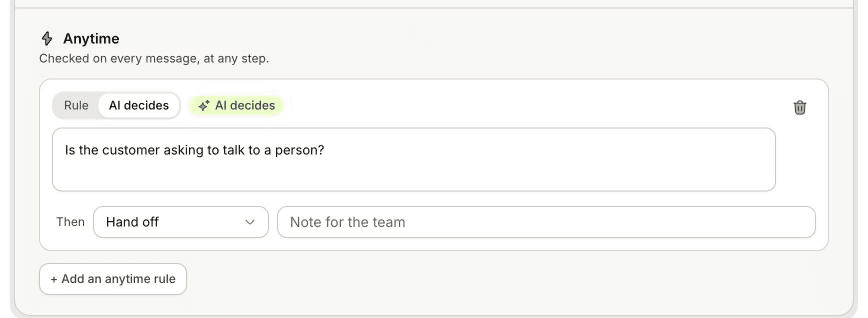
What you should see
After you select Save, Mando AI shows Procedure saved. The procedure appears on the Automations page under Your automations, labelled Procedure, with its number of steps and the status Draft.
Troubleshooting
"Step 2 has nothing to ask for yet"
An Ask for step has no value. Open the step, select + Add value, name the value, then save again.
"Give every value a name"
Each value needs its own name, and two values cannot share one. A Multiple choice value also needs at least two choices.
Frequently asked questions
How many steps can one procedure have?
A procedure in Mando AI can hold up to 40 steps, 20 values and 10 anytime rules. A Condition step can have up to 4 branches, plus an OTHERWISE branch.
What kinds of values can a procedure ask for?
An Ask for step can ask for Text, Number, Yes or no, Date, Phone, Email and Multiple choice values. A Multiple choice value holds up to 10 choices.
What happens if I leave the editor without saving?
The editor shows an Unsaved label while you have changes, and asks before you leave: "You have unsaved changes. Leave anyway?". Select Save first to keep your work.
Do I need a step that asks for the customer's phone number?
Not when you only send the number to your system. In a Call an API step, choose The customer's number: on WhatsApp and phone calls it is the number the customer writes or calls from, so the AI agent never asks for it. On other channels the AI agent asks for it once. See How to call your API from a procedure.