
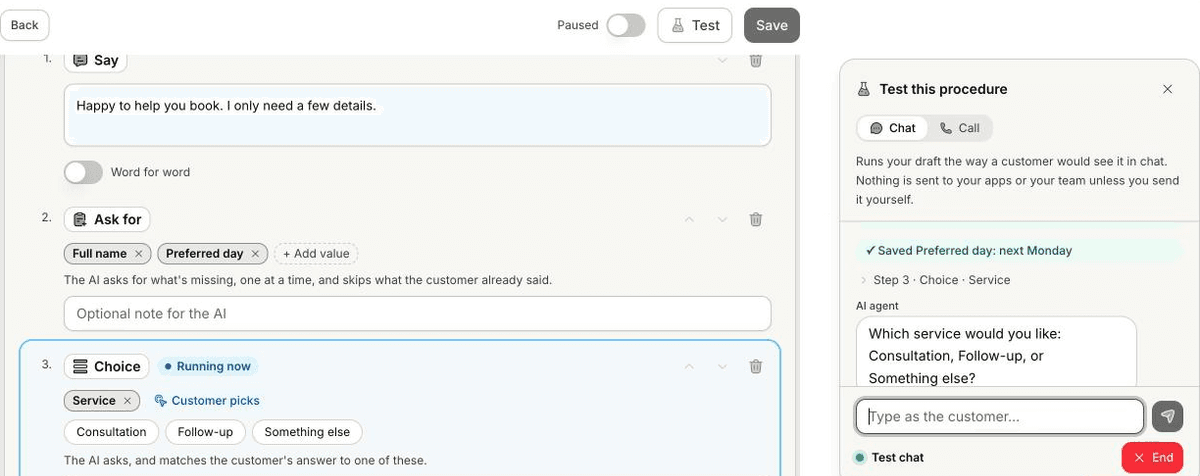
In Mando AI you can test a procedure from its editor before any customer reaches it. Select Test, then chat or call as if you were the customer. The test runs the steps on screen, even before you save, and shows each step as it runs.
Before you start
- You need a procedure with at least one step. See How to write a procedure for your AI agent.
Steps
- Open the procedure and select Test at the top.
- In the Test this procedure panel, choose Chat to type as the customer, or Call to talk to the AI agent.
- Type a first message, then answer the AI agent's questions the way a customer would.
- Watch the panel. It lists each step as it runs and each value it saved, and the step that is running is marked Running now in the editor.
- Select End to stop the test. Type again to start a new one.
What does a test send?
A test in Mando AI sends nothing to your apps or your team unless you send it yourself. A Hand off step shows that it would hand off to your team. A Webhook step and a Use an app step show where they would send. A Call an API step shows the call it would make and sends nothing, unless Also call it in a test is on for that step. For a Use an app step, the panel offers a button to send the test row for real when you want to check the result in your app.
What you should see
The panel starts with Procedure started, then shows a line for each step with its number and name. When the AI agent saves an answer, the panel shows it as Saved with the value's name. A Condition decided by the AI shows the AI check and its verdict. At an End step the panel shows Procedure finished.
Troubleshooting
"Too many chat tests this hour"
Chat tests are limited each hour. Wait a while, then start the test again.
"It isn't set to run on web chat. The test runs its steps anyway."
This line is a reminder, and the test still runs. If customers should reach the procedure on web chat, add Web chat next to Runs on under When to use, then save.
Frequently asked questions
Do I have to save a procedure before I test it?
No. A test in Mando AI runs what is on screen, even before you save. Select Save when the test goes the way you want.
Can I test a phone call?
Yes. Choose Call in the Test this procedure panel and select Start a test call. You talk to the AI agent, and the panel shows each step as it runs. Use Mute and End to control the call.
Will a test message reach my customers or my team?
No. A test runs only in the Test this procedure panel. Nothing is sent to your apps or your team unless you send it yourself.