
In Mando AI, the Call an API step lets a procedure ask your own system during a conversation and use the reply in the steps that follow. You give the step an address, the headers your system expects, what to send, and which parts of the reply to keep.
Before you start
- You need the address of your system. It must start with https:// and reply in JSON.
- Have the key your system expects ready, if it asks for one.
- Create the procedure and the values it sends first. See How to write a procedure for your AI agent.
Steps
- Open the procedure, select Add a step, then Call an API.
- Name the call, for example Find the order.
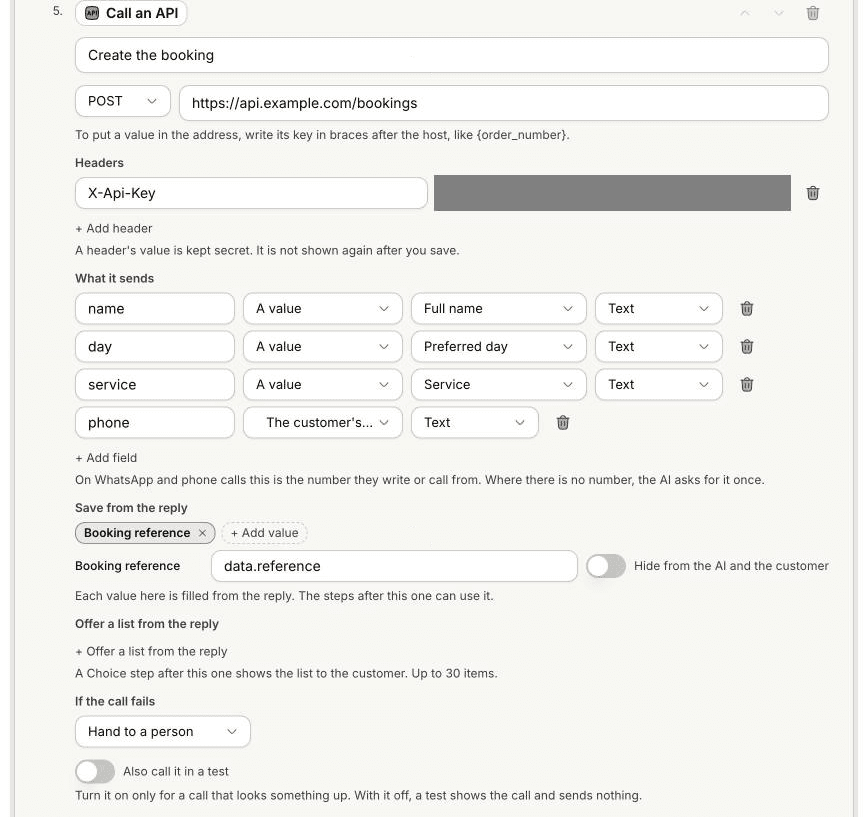
- Choose GET or POST and type the address. To put a value in the address, write its key in braces after the host, like {order_number}.
- Under Headers, select + Add header, then type the header's name and its value.
- Under What it sends, select + Add field. Type the field's name in the request, then choose where it comes from: A value, Fixed text or The customer's number.
- Under Save from the reply, select + Add value and type where the value is in the reply, like data.order.status.
- Under If the call fails, choose Carry on, Hand to a person or Go to a step.
- Select Save.
How is my key kept safe?
A header's value is kept secret in Mando AI. It is not shown again after you save, and the editor shows it masked. To change a key, type the new value in place of the masked one and save.
How do I send the customer's phone number?
Choose The customer's number for a field. On WhatsApp and phone calls this is the number the customer writes or calls from, so the AI agent does not ask for it. Where there is no number, such as web chat, the AI agent asks for it once.
How do I offer a list from the reply?
Select + Offer a list from the reply to show the customer options that come from your system, such as open times or branches. Say where the list is in the reply, like data.items, where each item's name is, like name, and which choice the list fills. Add a Choice step after the call: it shows the list to the customer. A list offers up to 30 items, and you can keep parts of the picked item, like its id, for the next call.
What you should see
In a test, the Call an API step shows that it would call your address, and sends nothing. Turn on Also call it in a test only for a call that looks something up. With it on, a test makes the call for real and shows what came back.
Troubleshooting
The call did not go through
A test names the reason. Your system did not answer within 10 seconds, the reply was not JSON, the reply was too large, the address redirects (a redirect is not followed), the address cannot be called, a value the call needs is missing or not valid, or your system answered with an error status. Fix the cause in your system or in the step, then test again.
"Enter a value for the header" when switching the procedure on
A procedure cannot be switched on while a header has a name and no value. Open the Call an API step, type the header's value, select Save, then switch the procedure on.
Frequently asked questions
Can I see my API key again after I save?
No. A header's value is kept secret and is not shown again after you save. Keep your own copy of the key, and type a new value in the header when the key changes.
Does the address have to use https?
Yes. The address of a Call an API step must start with https:// followed by a host. Values in braces can appear only after the host, so a value can never change where the call goes.
How many headers and saved values can a call have?
A Call an API step in Mando AI can hold up to 10 headers and can save up to 10 values from the reply. A list from the reply can keep up to 3 parts of the picked item.