
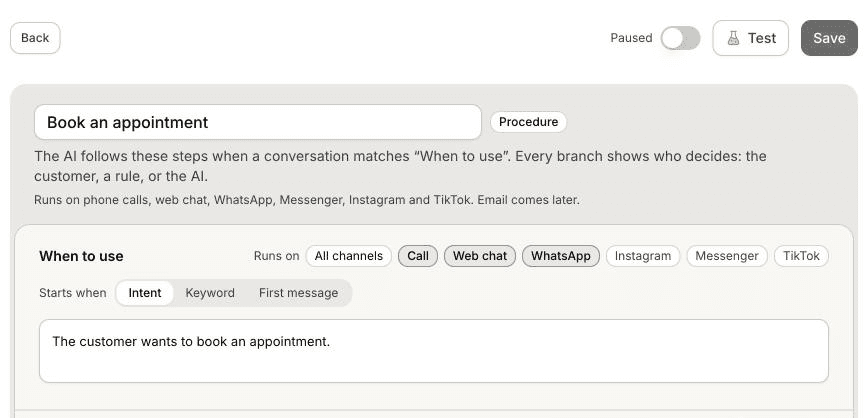
A procedure in Mando AI stays off until you switch it on. Open the procedure, check when it starts and where it runs under When to use, select Save, then turn on the switch next to the Test button. The label changes from Paused to Active, and the AI agent starts using the procedure.
Before you start
- Write and save the procedure. See How to write a procedure for your AI agent.
- Test it first. See How to test a procedure before customers use it.
Steps
- Open your AI agent, go to Automations and open the procedure.
- Under When to use, choose what starts the procedure next to Starts when. Choose Intent and describe what the customer wants, for example: The customer wants to place an order. Choose Keyword and type words separated by commas. Choose First message to run the procedure from the start of every call or chat.
- Next to Runs on, select the channels: All channels, or any of Call, Web chat, WhatsApp, Instagram, Messenger and TikTok.
- Select Save.
- Turn on the switch at the top, next to the Test button. The label changes from Paused to Active.
What you should see
The label next to the switch reads Active, and the procedure's card on the Automations page shows the same status. From then on the AI agent starts the procedure in conversations that match When to use, on the channels you selected. The card on the Automations page has its own switch, so you can turn a procedure on or off without opening it.
How do I turn a procedure off?
Turn the same switch off. The label changes to Paused and the AI agent no longer starts the procedure in new conversations. The procedure and its steps stay saved.
Troubleshooting
"Save your changes first"
The switch does not work while the procedure has unsaved changes. Select Save, then use the switch.
"Enter a value for the header" when switching on
A Call an API step has a header with a name and no value. Type the header's value, select Save, then switch the procedure on. See How to call your API from a procedure.
The procedure is Active but does not start
Check three things. Runs on must include the channel the customer uses. When to use must match the conversation: an Intent should describe what the customer wants, and a Keyword must appear in the customer's message. Your plan must include Procedures: Business, Scale, Enterprise or a free trial.
Frequently asked questions
How many procedures can one AI agent have?
An AI agent in Mando AI can have up to 20 procedures, and more than one can be Active at the same time. Each procedure starts only in conversations that match its own When to use.
What does First message do?
First message runs the procedure from the start of every call or chat on the channels you selected. Use Intent or Keyword when the procedure should start only for one kind of request.
Can a procedure run on email?
No. Procedures run on phone calls, web chat, WhatsApp, Messenger, Instagram and TikTok. Procedures do not run on email.