
Collect Contact Info is a built-in action that has your AI ask the customer for their name, email or phone during a chat. Switch it on from the Automations page, then fine-tune it on its settings page.
Turn it on
On the Automations page, flip the switch on the Collect Contact Info card, or click the card to open its settings. When you switch it on, it defaults to asking when a conversation is handed to a human.
Choose when the AI asks
On the settings page, pick a timing:
At the start of the chat: the AI gathers the details before it answers.
When handing off to a human: the AI only asks as the conversation is escalated.
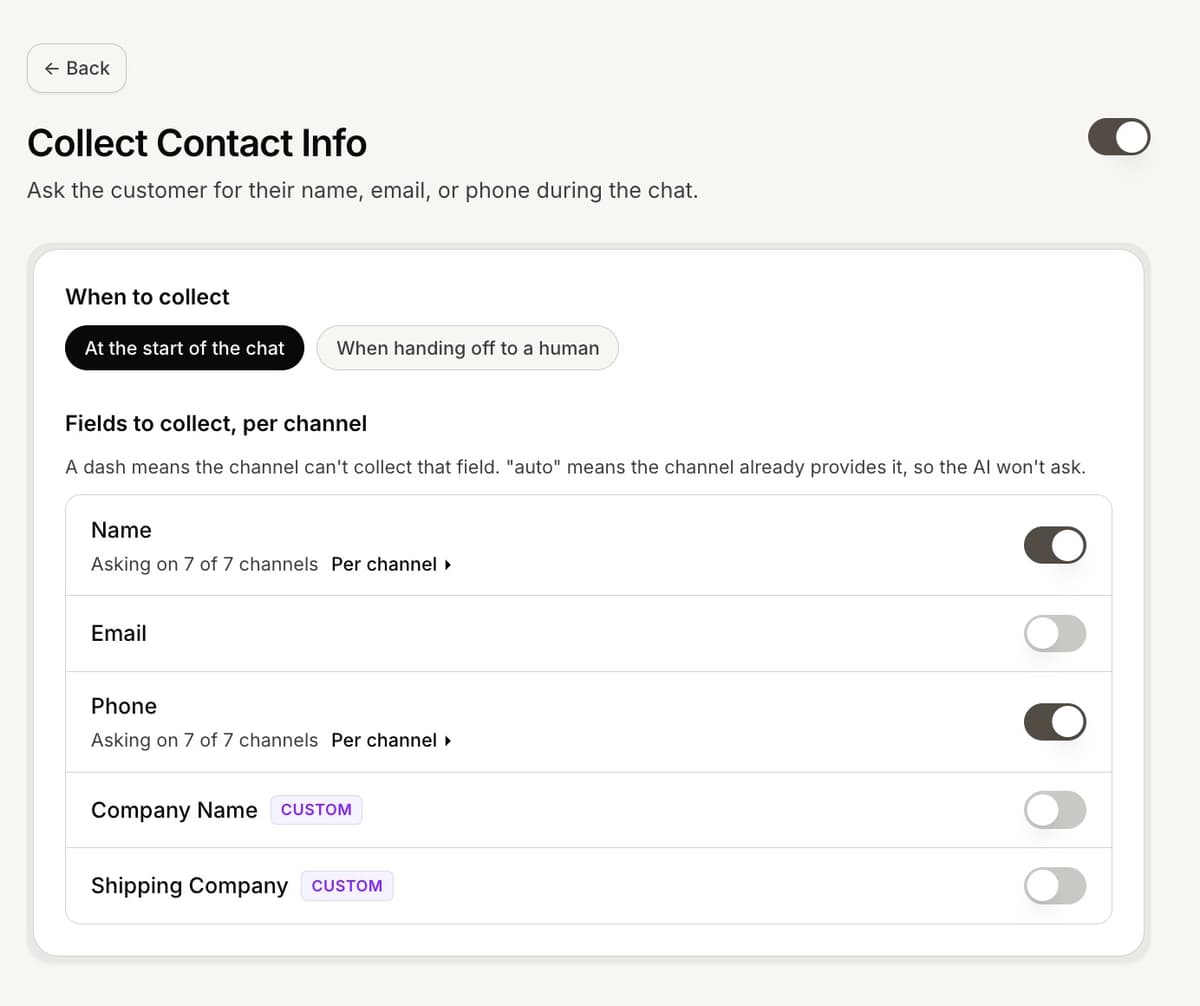
Fields and channels
Turn on Name, Email or Phone, and expand a row to choose which channels ask for it. A channel marked auto already provides that detail, so the AI will not ask. A dash means the channel cannot collect that field, such as email on a voice call.
Where collected details appear
Whatever the AI collects lands on the customer in the conversation details panel: their name, email and phone show in the Customer section, and any custom fields appear under More.
Frequently asked questions
Does turning it on ask at the start?
No. It defaults to asking on handoff. Pick "At the start of the chat" to ask up front.
Why is a channel greyed out for a field?
Either the channel already provides it (auto) or it cannot collect it (a dash), such as email on voice.
Where do I see what was collected?
In the conversation details panel, in the Customer section.