
Importing brings a list you already hold into Mando so your contacts are all in one place and reachable by campaigns.
It needs the Audience Import add-on, and you must be an Admin or Super Admin.
Prepare your file
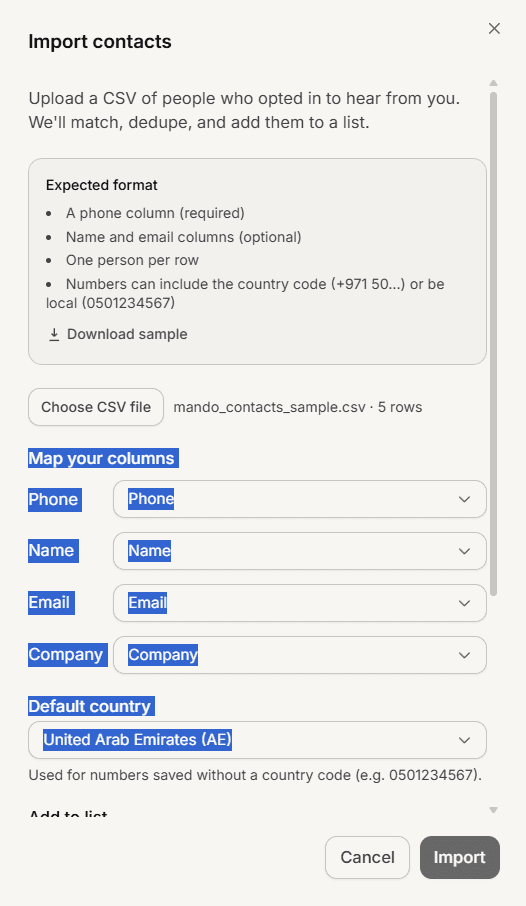
Use a CSV with one person per row and a header row. Mando reads four things: phone, name, email and company. Your headers do not have to use those exact words, because you map the columns yourself, and common names are detected automatically.
Phone numbers can include the country code or be local. Anything else in the file is ignored.
The limit is 10,000 rows per import. A larger file has to be split, and you will be told if yours is too big.
Steps
Open CRM, then Contacts, and select Import.
Optionally select Download sample to get a correctly formatted example file.
Select Choose CSV file and pick your file.
Check the mapping under Map your columns. A phone column must be mapped before you can continue.
Set Default country so local numbers are read correctly.
Choose a list to add everyone to, either a new one or an existing one. This is required.
Tick the consent confirmation.
Select Import.
About the consent confirmation
You are asked to confirm these people opted in to hear from you. This is not paperwork. Messaging people who did not opt in is the fastest way to get your WhatsApp number restricted, which affects every customer you serve on that number.
If you are unsure whether a list opted in, do not import it.
Reading the result
When it finishes you get a summary counting four outcomes:
New, contacts that did not exist before
Updated, existing contacts whose details changed
Unchanged, existing contacts that already matched
Invalid, rows with no usable email or phone number
Duplicates are never created. Mando matches on email first and phone second, so importing the same file twice is safe and simply reports everything as unchanged.
If many phone numbers could not be read, you will be told, and the panel stays open so you can correct the default country and import again.
Frequently asked questions
Can I undo an import?
No. Select the contacts in the list and delete them if you need to reverse it.
Are rows with errors skipped or does the import fail?
Rows with no usable email or phone are skipped and counted as invalid. The rest still import.
Can I import other file types?
CSV only.
Can I import custom columns?
No. Only phone, name, email and company are read.