
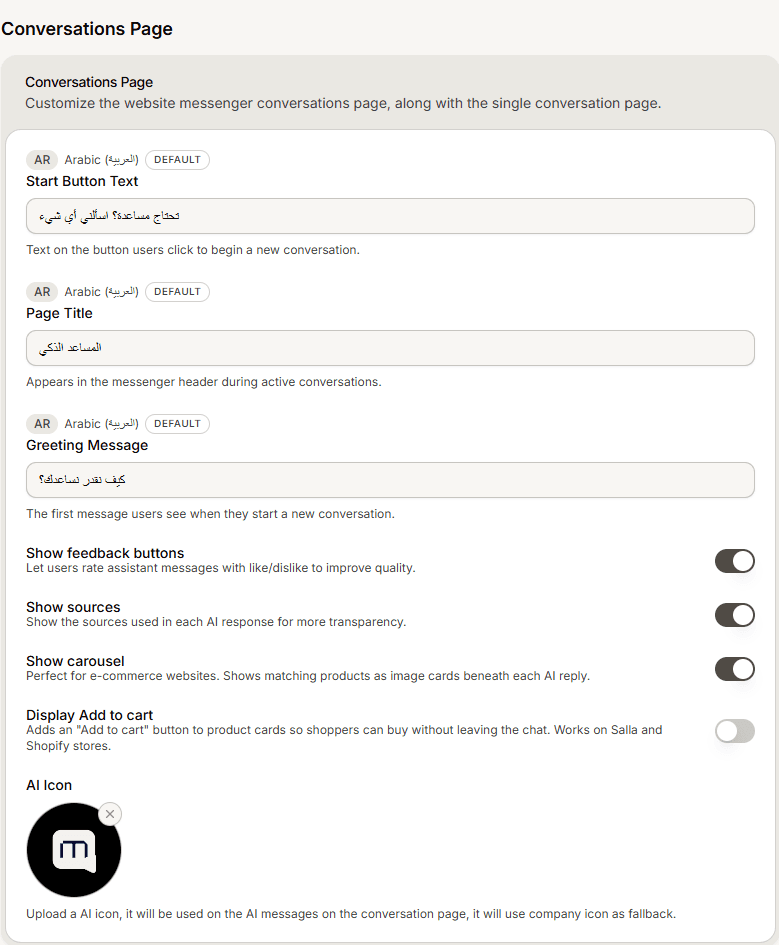
This is the first message a visitor sees when they start a new conversation. It sets the tone before your AI agent answers anything, and it is a different setting from the home screen welcome.
Steps
Open your agent and find the Conversations Page section of the widget content settings.
Write the Greeting Message.
Optionally set the Page Title shown in the messenger header during a conversation, and the Start Button Text.
Save and check the preview.
Two greetings, two jobs
The home screen greeting welcomes someone to the widget. This conversation greeting opens the chat itself. A visitor with the home screen enabled sees both, one after the other, so avoid writing the same sentence twice.
Use the home greeting to say who you are, and the conversation greeting to invite the question.
Frequently asked questions
Does the AI write this message?
No, you write it. It is shown before the agent responds to anything.
Does it appear on WhatsApp and other channels?
No. These settings are for the website chat widget.
I turned off the home screen. Which greeting shows?
This one. With no home screen, the conversation greeting is the first thing a visitor reads.