
Widget colour is set in two places: the general colours that apply throughout, and the header colours which have their own controls including a gradient option.
Steps
Open your agent and go to Set Design.
Under General, set the Action Color. This is used for buttons, links and other key interactive elements, so it is the one visitors notice most.
Set the Background Color, which covers the messenger background.
Under Header, choose a Background Type: Color or Gradient.
Set Color 1. If you chose Gradient, set Color 2 as the second stop.
Set Text Color to Light or Dark, whichever reads better against your header.
Save and check the preview.
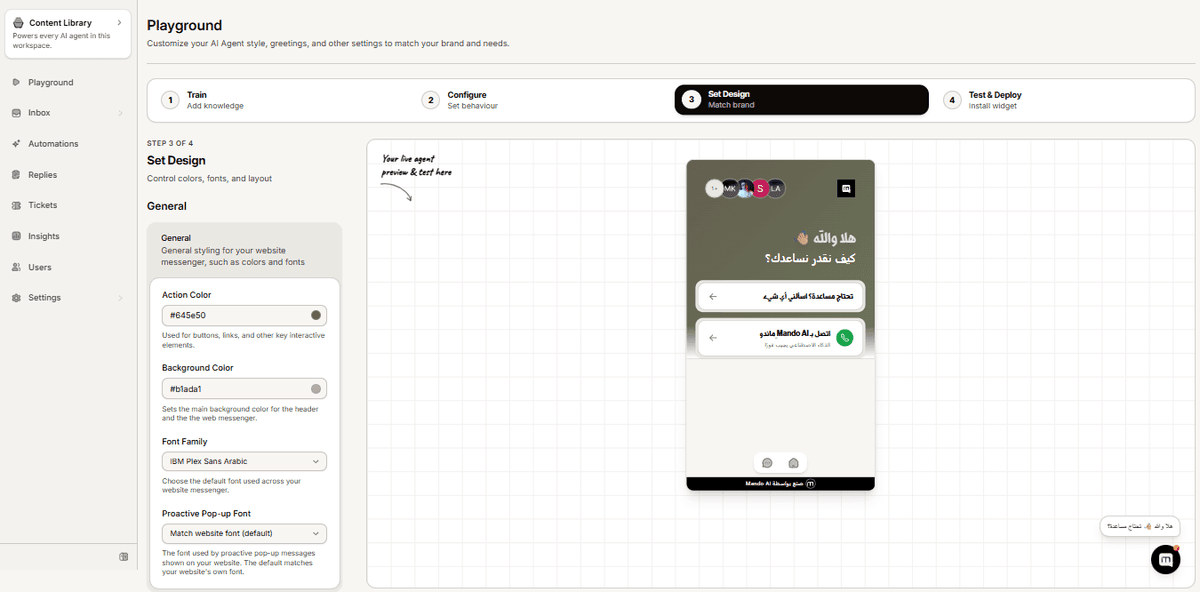
Getting it readable
Text Color is the setting people skip, and it is the one that breaks a widget. A dark header with dark text is unreadable, and the colour pickers will not stop you. Set your header colour first, then pick Light or Dark text to suit it.
Faded Background adds a soft fade below the header if you want a little depth rather than a hard edge.
Frequently asked questions
What is the difference between Action Color and header colour?
Action Color applies to buttons and links throughout the widget. The header colours only affect the bar at the top.
My colour looks different on the live site
Check you saved, and that you are not viewing a cached version of your page. The preview and the live widget use the same settings.
Can I use a gradient anywhere else?
The gradient option is specific to the header.