
Quick prompts are suggested questions shown inside a conversation, so a visitor can tap instead of typing. Each one appears at the start of a conversation, after the visitor has sent a message, or both.
Steps
Open your agent and go to Quick Prompts.
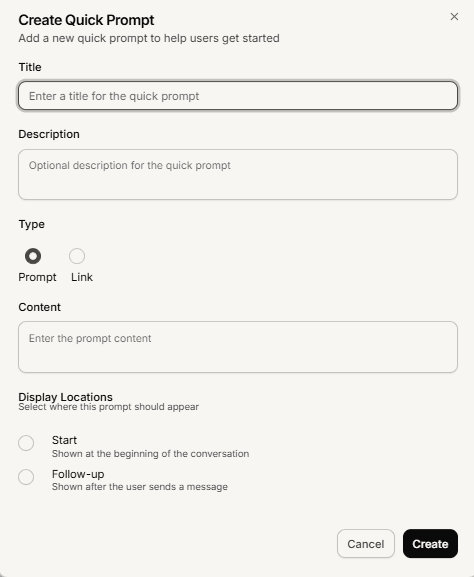
Select Add Quick Prompt.
Enter a Title. This is what the visitor sees on the button.
Choose the Display Locations. Pick Start to show it at the beginning of the conversation, Follow-up to show it after the visitor sends a message, or both. At least one is required.
Add the Content: either the message text sent when the visitor taps it, or a link to open instead.
Optionally add a description, then save.
How many to add
Mando does not cap the number, which makes restraint your job. A visitor scans a couple of buttons and ignores a wall of them, so a handful of genuinely common questions beats a long list. Start with three or four covering what people ask most, and add more only when you can name the question each one answers.
Frequently asked questions
What is the difference between Start and Follow-up?
Start appears at the beginning of a conversation, before anyone has typed. Follow-up appears after the visitor sends a message. A prompt can use both.
Can a quick prompt open a page instead of sending a message?
Yes. Give it a link instead of message text and it opens that URL.
Are these the same as ice breakers?
No. Ice breakers appear near the launcher before the widget is opened. Quick prompts live inside the conversation.