
Almost everything a visitor sees in the Mando chat widget is yours to change. The settings are grouped into four areas: general colours and fonts, the header, the launcher, and the content of the home and conversation screens.
Colours and fonts
Set the Action Color used for buttons and links, the Background Color for the messenger, and the Font Family used throughout. Proactive pop-ups can inherit your website font or use their own.
The header
The header takes a solid colour or a gradient, with a second colour when you choose gradient. You can add a soft fade beneath it, switch the text between light and dark for readability, and show your company icon or your team members' avatars.
The launcher
The launcher is the bubble visitors click. Put it on the left or the right, and adjust its horizontal and vertical gap in pixels so it does not sit on top of anything else on your site.
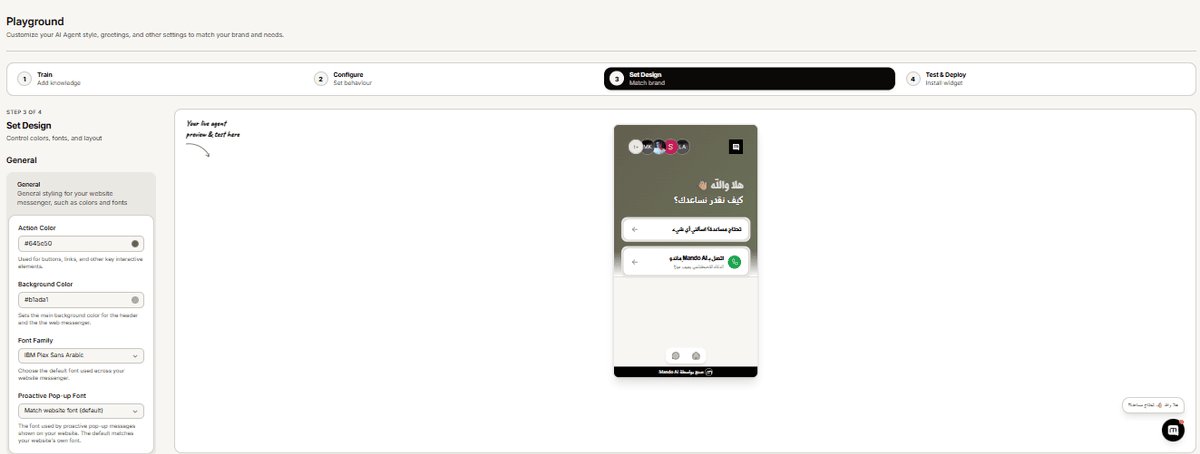
The two screens
The widget has a home screen, shown before any conversation starts, and a conversation screen. Each has its own greeting and its own settings, which is the single most common source of confusion: changing one does not change the other.
The conversation screen also carries the visitor-facing extras: product carousels, an add to cart button, feedback buttons and answer sources.
Frequently asked questions
Where do I see my changes?
The live preview beside the settings. It shows saved settings, so save first if a change has not appeared.
Can I remove the Mando branding?
Yes, with the branding add-on on any paid plan.
Do these settings affect WhatsApp or Instagram?
No. They only change the chat widget on your website. Other channels use their own interfaces.