
Your agent's role is the starting point for how it behaves. Mando offers Customer Support, Sales, Technical Support, Assistant and Custom. The role you pick sets the default behaviour, and you can refine it later.
Steps
Open your agent and go to Settings, then the AI model section.
Under Agent Behaviour, choose an Agent Role.
Save.
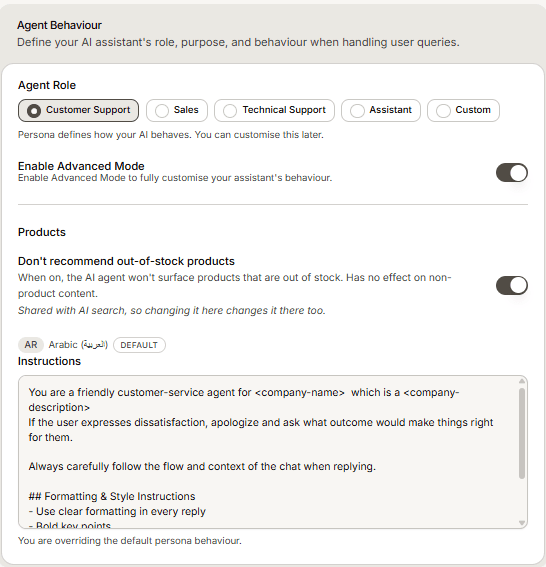
Which role to pick
Customer Support for answering questions and resolving problems. The right default for most businesses.
Sales when the agent should guide people toward buying.
Technical Support for troubleshooting a product in depth.
Assistant for general help that is not clearly support or sales.
Custom when none of them fit and you want to describe the job yourself.
Frequently asked questions
Can I change the role later?
Yes, at any time. It changes how the agent replies from that point on.
What if the role is nearly right?
Keep the role and add instructions with Advanced Mode rather than switching to Custom. Mando warns you when your own instructions override the default behaviour of the role.