
The Overview page is the home screen of a Customer Service agent. It shows how the agent is performing and is where you turn on the daily summary report.
What is on the page
Open your agent and the Overview is the first thing you see. The analytics beneath the header cover how your agent is handling conversations, so it is the quickest read on whether things are healthy after a change to content or settings.
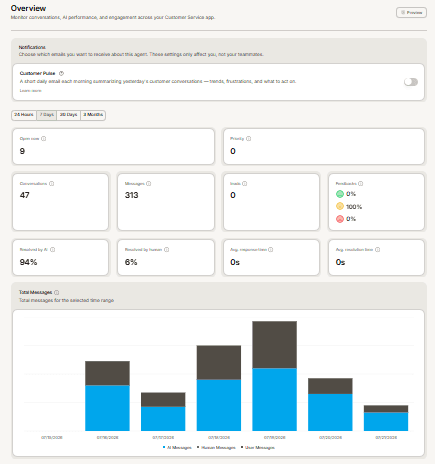
Customer Pulse sits at the top
The first card on the page is the opt-in for Customer Pulse, a summary of your agent's activity delivered by email. Switch it on here.
Two details worth knowing. It goes only to admin-tier people who individually opted in, not automatically to everyone. And it is a paid-plan feature, so the toggle is unavailable on plans that do not include it.
Frequently asked questions
Why is the Customer Pulse toggle greyed out?
Your plan does not include it. The page shows an upgrade link beside the toggle.
I turned Customer Pulse on but received nothing
It sends on a daily schedule rather than immediately, and nothing is sent for a day with no conversations. Confirm you are on a plan that includes it.
Do my teammates get the report too?
Only those with an admin-level role who have opted in themselves.