
The Visibility controls in Test and Deploy decide which entry points appear on your website. It is worth being precise about what they do, because the obvious reading is wrong: they hide interface, they do not switch your agent off.
The two toggles
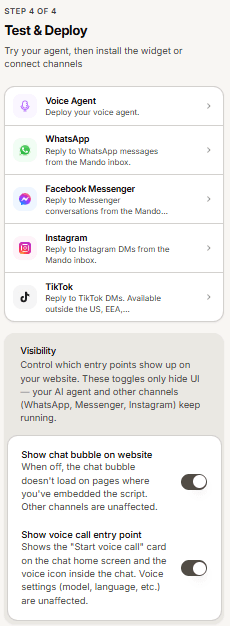
Show chat bubble on website. When off, the chat bubble does not load on pages where you embedded the script. Other channels are unaffected.
Show voice call entry point. Controls the voice call card on the chat home screen and the voice icon inside the chat. Your voice settings are unaffected.
What these toggles do not do
They only hide user interface. Your AI agent keeps running, and your other channels keep working: WhatsApp, Messenger and Instagram carry on answering exactly as before. Turning off the chat bubble does not pause your agent, stop message usage from those channels, or take your agent offline.
How to actually take an agent offline
If you need the agent to stop responding entirely, do not rely on the visibility toggles. Remove or disconnect the channels it answers on, and remove the widget script from your site. Hiding the bubble is right for a temporary cosmetic change, not for switching the agent off.
Frequently asked questions
I hid the chat bubble but conversations are still arriving
Expected. They are coming from your connected channels, which the toggle does not touch.
Does hiding the bubble stop my message usage?
Not by itself. Messages from other channels still count.