
The Playground shows a live preview of your agent beside whatever you are editing. Use it to ask the agent real questions and to see design changes as visitors would.
Steps
Open your agent and go to the Playground.
Find the preview beside the settings. On a narrow screen it moves into a drawer you open rather than sitting alongside.
Type a question a customer would actually ask, and read the reply.
Ask a follow up. Most weaknesses show on the second or third message, not the first.
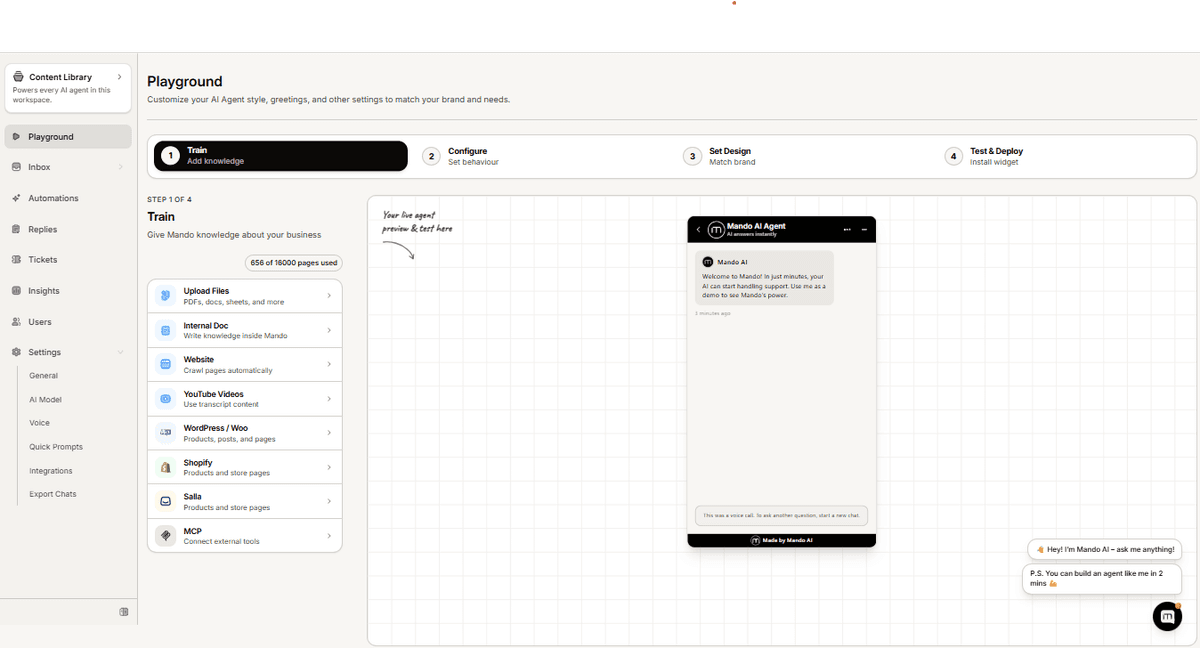
The preview shows saved settings
This is the thing worth knowing. The preview reflects what has been saved, not what you are currently typing. If a change does not appear, save it first, then reload the preview.
Troubleshooting
The preview is blank
Reload the page. If it stays blank, confirm the agent has been created and that content has finished processing.
My change is not showing
Save the setting, then reload. Unsaved edits never appear in the preview.
The preview disappeared
You are on a narrower screen. Open the preview drawer instead of expecting a side by side layout.