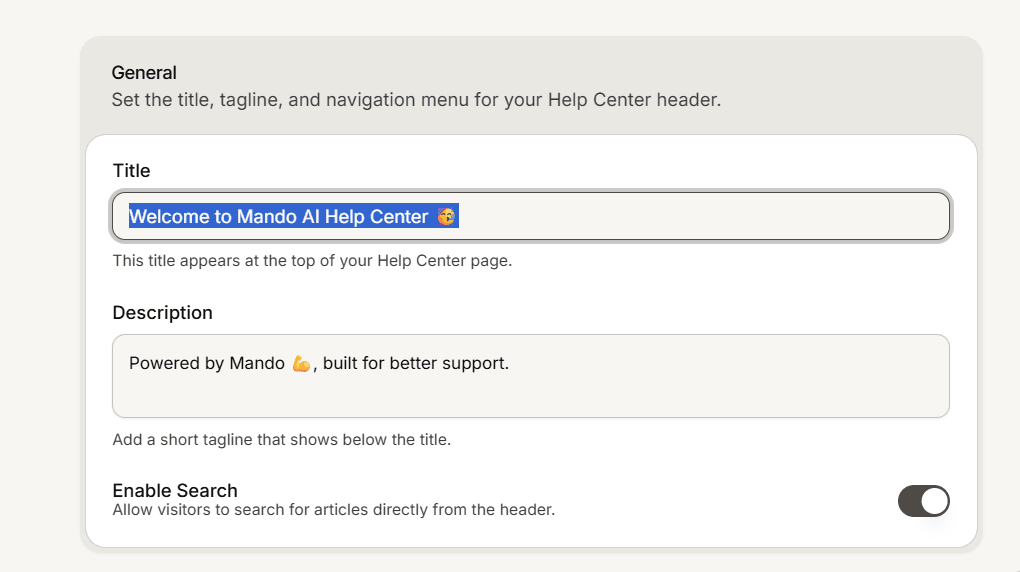
Two different settings are both labelled Title. One is the heading readers see at the top of your public site, the other names the app inside your dashboard. Setting the wrong one is the most common reason a site still shows the wrong name.
The title readers see
Open Settings inside your help center and go to the Header tab.
In the General card, fill in Title. The field note says it appears at the top of your Help Center page, and that is exactly what it does.
Save.
This is also the name search engines show for your site, so write it the way you want it read in results: your brand name, or your brand name followed by Help Center.
The app title in General settings
Go to Settings and stay on the General tab.
Edit Title in the General Settings card, then save.
The field describes itself as an internal name, and that is mostly how it is used: it labels the app across your dashboard. It is not purely internal though. It also appears publicly in two cases:
As the wordmark in your site header, while no logo image is uploaded.
As the site name for search engines and link previews, while the header title above is still empty.
Set the header title and upload a logo, and readers never see this one.
Rules that apply to both
A title has to be at least 3 characters and at most 255. Shorter values are rejected when you save.
The General tab saves the title together with the description, the on and off switch and the custom domain, so one save covers the whole page.