
Uploading documents is the quickest way to teach your agent things that are not on your website: policies, price lists, product sheets, internal procedures. Mando reads each file and adds its content to your Content Library.
What you can upload
Mando accepts PDF, Word (.docx), PowerPoint (.pptx), Excel (.xlsx), OpenDocument text and presentations (.odt, .odp), HTML, Markdown (.md) and plain text (.txt).
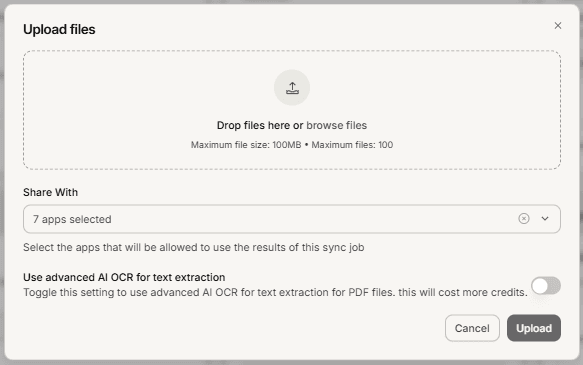
Each file can be up to 100 MB, and you can add up to 100 files at once.
Steps
Open the Content Library and go to the Sources tab.
On the Files tile, start an upload.
Select your documents, or drag them into the uploader. The list shows each file with its name, size and type.
Check for any row marked with an error badge and remove or replace it.
Confirm the upload.
.
What you should see
Your files appear under the Files tile, and their content appears in the Content tab once Mando has read it. Give it a moment: a document is not usable by your agent the instant it finishes uploading.
Troubleshooting
A file was rejected
It is either an unsupported format or over the 100 MB limit. Scanned images and video are not on the list. Convert the document to PDF or text, or split a very large file into parts.
The file uploaded but the agent does not use it
Two things to check. First, Mando may still be processing it. Second, the file's sharing settings decide which apps may use it, so confirm it is shared with the agent you are testing.
A scanned PDF produced nothing useful
A PDF that is only images of pages has no text to read. Use a version with real text.
Frequently asked questions
Do my files count toward my plan?
Yes. Uploaded documents count toward your page allowance like any other content. See How many apps each Mando AI plan includes.
Can I update a document later?
Upload the new version and remove the old one. Otherwise your agent can answer from both, and outdated prices or policies are exactly the kind of thing customers notice.
Can I keep a document internal?
Yes. Sharing settings on each item control which apps may use it, including keeping it for the internal co-pilot rather than the customer-facing agent.