
Every item in your content library has a Share With setting. It decides which of your AI agents may use that item when answering, and whether it is available to customers or only to your team internally.
Content that is shared with nobody stays in your library but never appears in an answer.
There are two versions of this control
Which one you see depends on your workspace. Both do the same job.
The standard version has three parts: a Co-pilot switch, a Share with Co-pilot only switch, and a Share With selector for choosing agents.
The newer version replaces all three with a single selector. Your internal co-pilot appears as one of the options in the list, alongside your agents, so there is one place to look instead of three.
Read the second switch carefully
If you have the standard version, note what Share with Co-pilot only means. Turning it on keeps the content internal and stops it reaching customers. Turning it off is what allows customer-facing answers.
It is easy to read that switch as making content more available when it does the opposite. If content you expected customers to get is not appearing in answers, check this switch first.
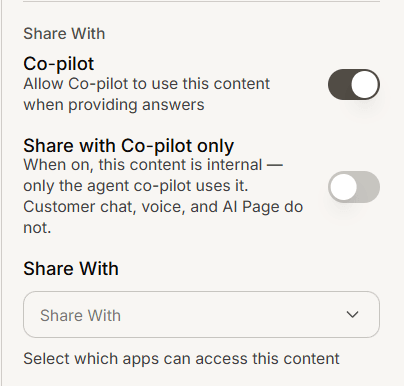
Which agents you can choose
The selector offers your customer service agents, AI Search apps and AI Pages. Help centers and newsrooms are not options, because they publish content rather than answer from it.
AI Search only appears for content types it can use, so you will not see it on every item.
Frequently asked questions
What is the co-pilot?
The assistant your team uses internally while handling conversations. Content shared with it helps your agents without being exposed to customers.
Why can I not select my help center?
Help centers and newsrooms are publishing destinations, not answering agents.
Does unsharing delete the content?
No. It stays in your library and stops being used in answers.