
Collections are the folders of your content library. They group related content so you can find it, filter it, and share a whole group with an agent in one action.
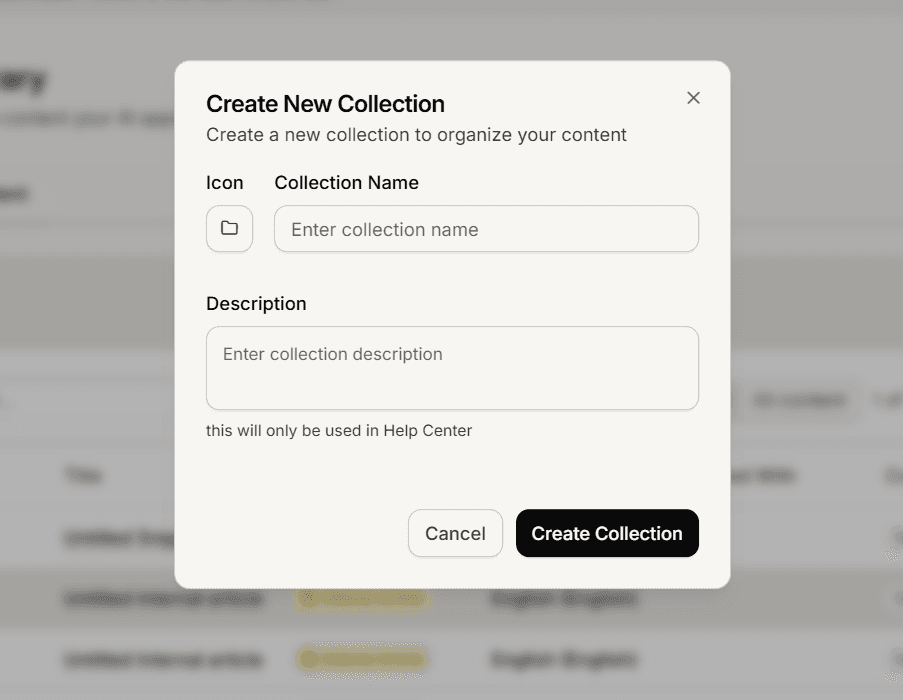
Create a collection
Open Content Library.
Select New Collection.
Give it a name, and a description if you want one.
To rename one later, open it and select Edit Collection.
Nesting
Collections can sit inside other collections, and there is no fixed depth limit. Two or three levels is usually enough. Deeper structures get harder to navigate without helping your agent answer any better.
Move content in
Open a content item and use the move option in its sidebar to choose a destination collection. There is no drag and drop in the content list.
Some collections are managed for you
Connecting a store or crawling a website creates a collection automatically to hold what it brings in. These are managed by that connection, so you will find you cannot edit or add to them the way you can with your own.
That is intentional. Their contents are replaced on every sync, so anything you added by hand would not survive.
Finding things
Above the list you can switch between This folder and All content, which decides whether you are looking inside the current collection or across everything.
You can also sort by newest, oldest, recently updated, or title, and filter by type, status, language and which agents the content is shared with.
Collections count toward your page limit
Each collection is one item in your library, so it uses a page. On a large plan this is irrelevant. On a small page allowance, a deep folder structure is worth thinking about.
Frequently asked questions
Does a collection control who can see the content?
Not by itself, but changing sharing on a collection applies to everything inside it.
Can I drag content between collections?
No. Use the move option on the item.
Why can I not add to my products collection?
It is managed by your store connection. Add products in your store instead.