
Members do not see your whole workspace. You tick, per app, exactly which parts they can reach. An app you do not tick simply is not there for them.
Steps
Open Team and select the person you want to change.
In the capabilities matrix, find the app you want to grant.
Tick the features this person should reach in that app.
Repeat for any other app, then save.
The matrix only appears for Members. Super Admins already reach everything, so there is nothing to configure.
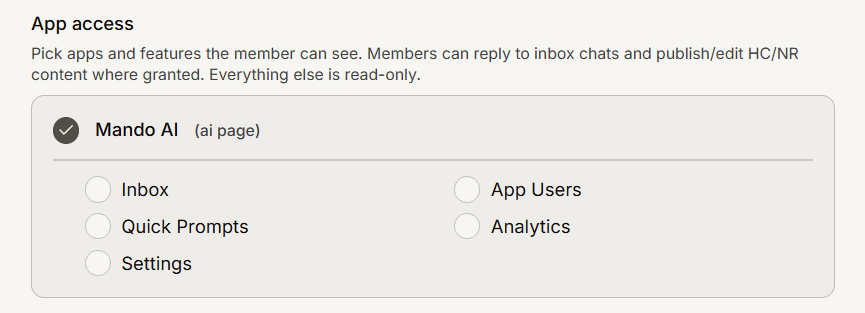
The capabilities you can grant
Depending on the app type, you can grant: Inbox, All inbox, Tickets, All tickets, App Users, Quick Prompts, Playground, Analytics, Settings, Integrations, Articles, Tags and Collections.
Remember what a capability actually buys: a Member can reply to inbox chats and publish or edit help center and newsroom content where granted. Everything else is read-only, so Settings and Integrations are visibility, not control.
What a member sees when an app is not shared
The app is absent rather than locked. It does not appear in their app switcher or their sidebar, and they cannot reach it by URL. There is no upgrade prompt and no padlock, because from their point of view the app does not exist. If a teammate says an app has disappeared, check their capabilities before assuming something broke.
Frequently asked questions
Who can change these settings?
A Super Admin.
Does granting Inbox let them see every conversation?
No. Inbox shows only chats assigned to them, and only for teams they belong to. All inbox is the capability that widens it.
Can I give someone access to one agent but not another?
Yes, that is exactly what the matrix is for. Tick one app and leave the other untouched.