
Mando will not let the last Super Admin leave an organization, because that would leave nobody able to manage billing, invite people or change roles. Promote someone else first, then leave.
Steps
Open Team and select the person taking over.
Change their Role to Super Admin and confirm. They can now change billing, invite anyone, and remove members.
Check the Team page shows at least one other Super Admin besides you.
Hand over anything tied to you personally, such as integrations you connected with your own account.
Leave the organization from your user menu, or ask the new Super Admin to remove you.
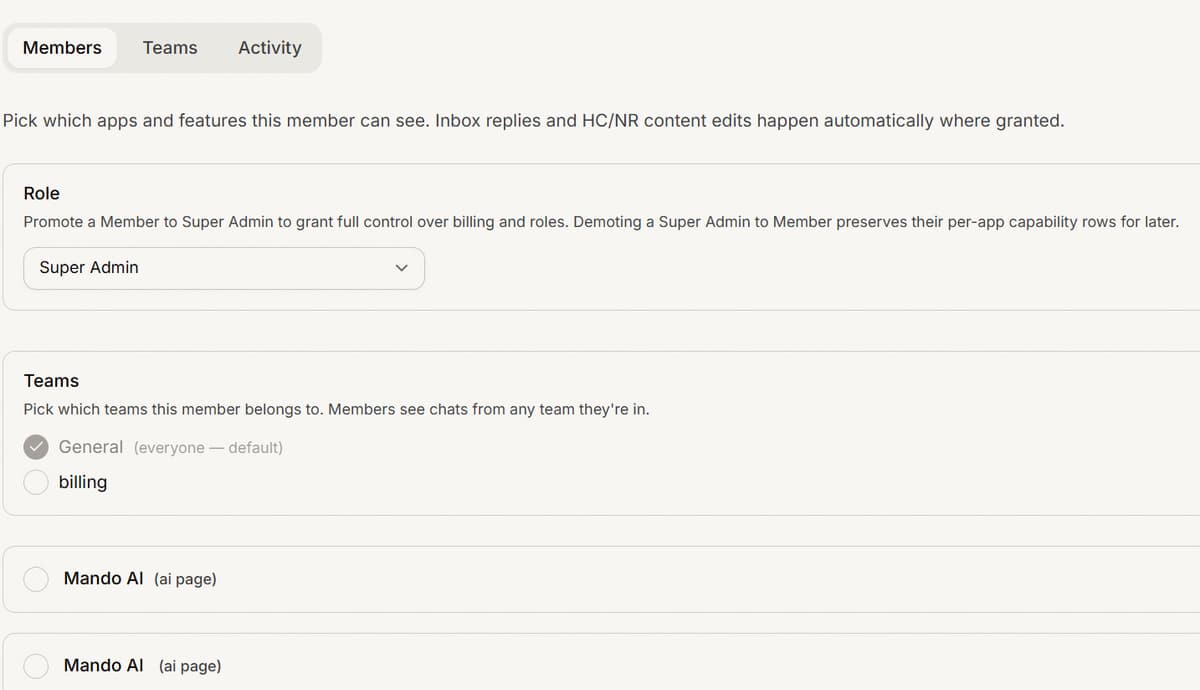
Troubleshooting
You are the only Super Admin. Transfer ownership before leaving.
Exactly the case this article prevents. Promote another member to Super Admin, then leave. Mando blocks the attempt rather than orphaning the organization.
I cannot change my own role
That is by design. Role changes are made on someone else's page, so you cannot demote yourself into a workspace with no owner. Promote your successor, then have them demote or remove you.
Frequently asked questions
What happens to my conversations and content when I leave?
They stay with the organization. Content and chats belong to the workspace, not to you.
Can I have two Super Admins permanently?
Yes, and you should. A single Super Admin is a single point of failure for billing and access.
Does leaving delete the organization?
No. Leaving removes your access, and the workspace carries on with its remaining members.