
Two capabilities decide how much of the inbox a Member sees. Inbox restricts them to their own conversations. All inbox opens up everything they are allowed to see. Tickets work the same way, with Tickets and All tickets.
Steps
Open Team and select the member.
Find the Customer Service app in the capabilities matrix.
Tick Inbox and leave All inbox unticked.
Save.
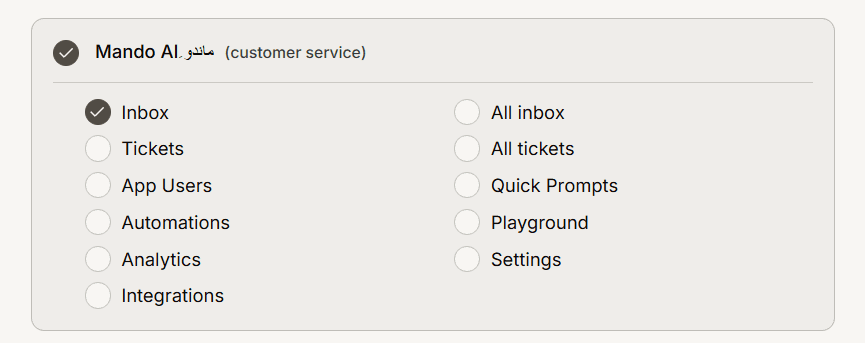
What that member can and cannot see
They see conversations assigned to them and can reply to those. They do not see the wider queue, so they cannot browse a colleague's chats or pick up unassigned work from other parts of the inbox.
This is the right setting for an outsourced agent, a contractor, or anyone who should only handle what is handed to them.
How this interacts with teams
Team membership and this capability stack, and both have to allow a conversation before the person sees it. Teams decide which conversations are in scope at all, since members see chats from the teams they belong to. The Inbox capability then narrows that to the ones assigned to them.
So a member restricted to their own chats and placed in no extra teams sees a very small inbox, which is usually the intent. If they seem to be seeing nothing at all, check whether anything is actually being assigned to them.
Frequently asked questions
Can they still be assigned work?
Yes. Restricting the view does not restrict assignment. Anyone who can assign conversations can send them one.
Does this hide tickets too?
No, tickets have their own pair. Leave All tickets unticked as well if you want the same restriction there.
Will they see analytics for conversations they cannot open?
Only if you granted Analytics. Consider leaving it off for restricted members, since aggregate numbers cover the whole app.