
A saved reply is an answer you keep so nobody types it again. Shipping times, return policy, opening hours: anything your team writes more than a few times a week.
Create one
Open your saved replies from the customer service agent.
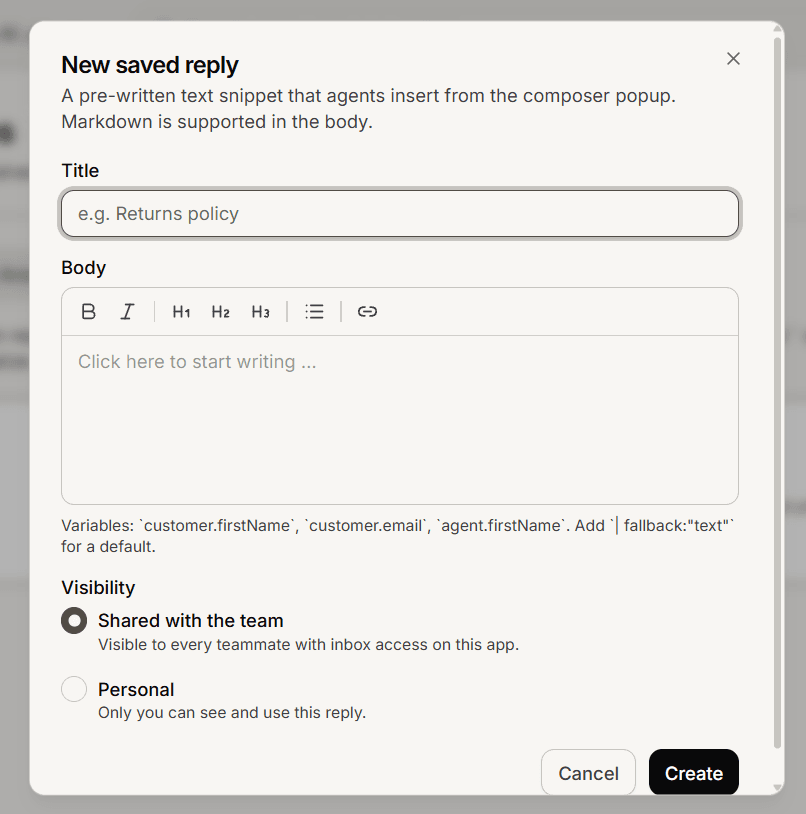
Create a new one.
Give it a short name your colleagues will recognise while scanning a list.
Write the reply text.
Choose whether it is yours or shared with the team.
Save.
Placeholders
You can include placeholders that fill in when the reply is inserted, so a saved reply can open with the customer name rather than reading like a form letter.
Write them in double curly braces, and give a fallback for when the detail is missing:
Hi {{ name | fallback:"there" }}, thanks for getting in touch.Always set a fallback. Without one, a customer whose name you do not have gets a reply with a gap in it, which is worse than a generic greeting.
Yours or shared
Yours is for phrasing you personally like. Shared puts it in front of the whole team.
Shared is the one that pays off. A shared reply for your returns policy means every colleague sends the same accurate answer, and correcting it once corrects it for everyone.
Anyone can edit their own replies. Shared replies can also be edited by an admin, which is how a wrong shared answer gets fixed when its author is away.
They belong to one agent
Saved replies are kept per customer service agent, not across your whole workspace. If you run two agents and want the same reply in both, create it in each.
They are for your team, not the AI
Saved replies are inserted by people. Your AI agent does not use them and does not read them.
So a saved reply is not a way to teach your agent something. If you want the AI to know an answer, put it in your content library instead. Doing both is reasonable: content for the AI, a saved reply for your team.
Frequently asked questions
Can I edit a colleague shared reply?
Only if you are an admin. Otherwise ask the person who created it.
Will the AI start using it?
No. Saved replies are human only.
Is there a limit?
None you are likely to reach in normal use.