
An internal note sits in the conversation where your colleagues will see it, and is never sent to the customer.
It is the difference between a colleague picking up a conversation knowing what has happened and starting from nothing.
How to add one
Open the conversation. It needs to be assigned to you, so take it on first if the composer is not there.
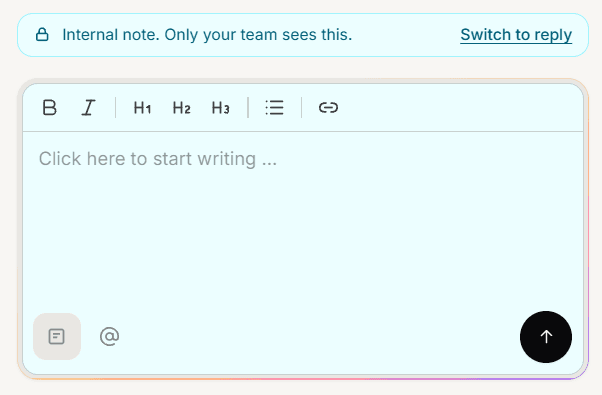
Switch the composer from reply to note.
Write and send.
Note mode is clearly marked so you can see at a glance that what you are writing is internal. Check that marker before typing anything you would not want a customer to read.
Notes do not move the conversation
A note does not count as replying. The conversation stays in Needs reply, which is correct, because the customer is still waiting on you.
This is worth relying on. You can note what you found, hand over, and the conversation stays visible in the queue rather than looking answered.
Notes work when replies do not
On WhatsApp you can only send a free-form reply within 24 hours of the customer last writing. Once that window closes the reply box is disabled.
Notes are exempt. You can still record what happened for your colleagues even when you cannot message the customer, which is exactly when a note is most useful.
What to put in one
The useful ones save someone else time:
What you already checked, so nobody repeats it
What the customer actually wants, when it differs from what they asked
Anything agreed by phone or in person that is not in the thread
Why you are handing it over
Frequently asked questions
Can the customer ever see a note?
No. Notes are excluded from everything sent out on any channel.
Can I note without taking the conversation?
The composer only appears on conversations assigned to you, so take it on first.
Does a note notify anyone?
Not on its own. Mention a colleague if you want them pulled in.