
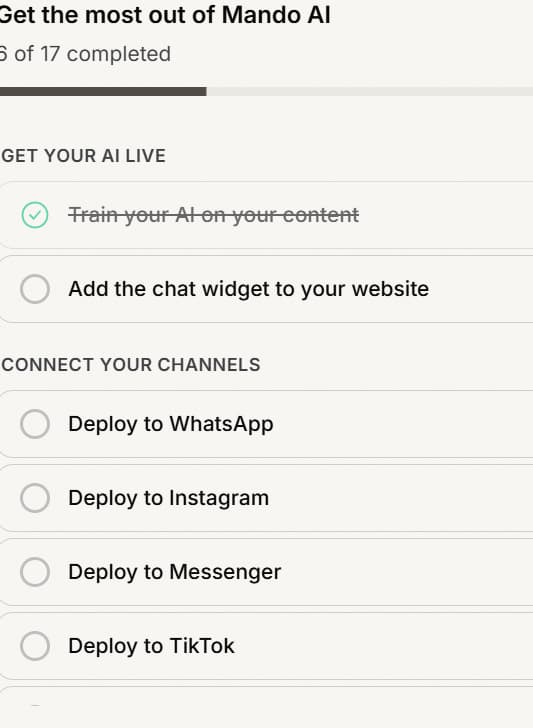
Mando has two getting started checklists, and they are separate. Begin with Mando AI sits at workspace level and covers setting up your organization. Get the most out of Mando AI lives inside a Customer Service app and covers getting that agent live. You never see both on the same screen, so it is worth knowing which one you are looking at.
What each checklist covers
The workspace checklist walks you through the shape of Mando: add content to your library, create an AI agent, deploy it. The Customer Service checklist is longer and groups its steps into five sections: Get your AI live, Connect your channels, Connect your store, Automate and scale, and Grow with more apps.
How steps get marked complete
You do not tick steps yourself. Mando checks whether the thing is actually done and marks the step complete for you, so adding content to your library or installing the widget completes the matching step on its own. The header shows your progress as a count of completed steps.
Skipping a step you do not need
Not every step applies to every business. Select Skip on a step that is not relevant, and Undo skip if you change your mind.
Worth understanding: a skipped step leaves the total, it is not counted as done. So skipping the steps you do not need makes your progress reflect the work that actually matters to you, rather than leaving you permanently short of the finish line.
Hiding the checklist
Skip tutorial at the bottom of the panel hides the whole checklist for that app.
Be deliberate about this one: there is no button to bring the checklist back afterwards. Once hidden it stays hidden, so use Skip on individual steps if you only want to clear the ones that do not apply. The Customer Service checklist also disappears on its own once that app has finished onboarding.
Frequently asked questions
Why does my progress say a smaller total than the number of steps I can see?
Skipped steps come out of the total, and a few workspace items are there for orientation and never complete. The count tracks the steps that still apply to you.
I completed something but the step still looks open
Reload the page. Steps are evaluated from your actual setup, so the checklist catches up once it re-reads it.
Does the checklist appear for my teammates too?
They see the same checklists for the workspaces and apps they can access. Skipping a step affects that app for everyone, not just you.
Do I have to finish the checklist?
No. It is guidance, not a gate. Nothing in Mando is locked behind completing it.