
Connecting your website is usually the fastest way to make an agent useful, because everything you already explain online becomes knowledge it can answer from. Mando reads your published pages and adds them to your Content Library.
Before you start
The site must be publicly reachable. Pages behind a login cannot be read.
Synced pages count toward your plan's page allowance, so consider excluding sections you do not need.
Steps
Open the Content Library and go to the Sources tab.
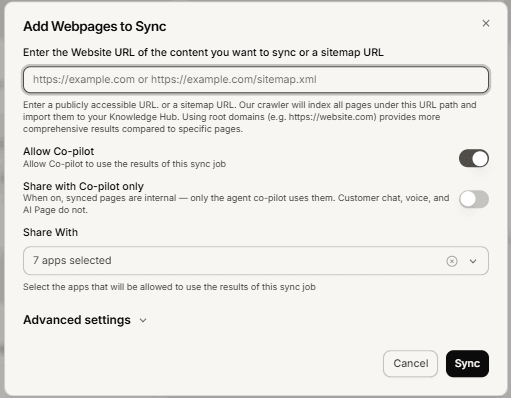
On the Website tile, start a new sync. The Add Webpages to Sync dialog opens.
Enter your website address, or a sitemap address if you have one. It must be a full public URL such as
https://example.comorhttps://example.com/sitemap.xml.Choose the scope. Full syncs every page under that address. Selective syncs only the pages you list in the Additional URLs field, one per line, which is the right choice when you only want a few sections.
Choose the processing mode. Fast Mode suits static sites and blogs. Full Mode is for JavaScript heavy sites such as single page apps: slower, but more accurate.
Optionally open Advanced settings to exclude parts of the site with URL patterns, for example
**/products/*, and to set which apps may use the results.Select Sync.
What you should see
Mando confirms that your website is syncing and tells you to check back in a few minutes. The Website tile on the Sources tab shows the job and its progress, and pages appear in the Content tab as they are read. A large site takes longer than a small one.
Troubleshooting
Please enter a valid URL
The address needs the protocol. Enter https://example.com rather than example.com.
Pages are missing after the sync
Three usual causes: the pages sit outside the base address you entered, an exclude pattern is catching them, or the content only appears after JavaScript runs. For the last one, run the sync again in Full Mode.
The crawler pulled in pages I did not want
Add URL patterns under Advanced settings to exclude them, or switch to Selective and list only the pages you want. Then remove the unwanted pages from the Content tab.
Please enter a valid glob pattern
Exclude patterns are path globs, not full URLs. Use the shape **/admin/** rather than a complete address.
Frequently asked questions
Does Mando re-read my site when I change it?
Your synced pages stay as they were read. Run the sync again after a significant change so the agent answers from the current version.
Should I use my sitemap or my homepage?
A sitemap is more reliable when you have one, because it lists the pages you actually publish rather than relying on links being followed.
Fast Mode or Full Mode?
Start with Fast Mode. If pages come back thin or empty, the site is likely rendering content with JavaScript, and Full Mode will read it properly.