
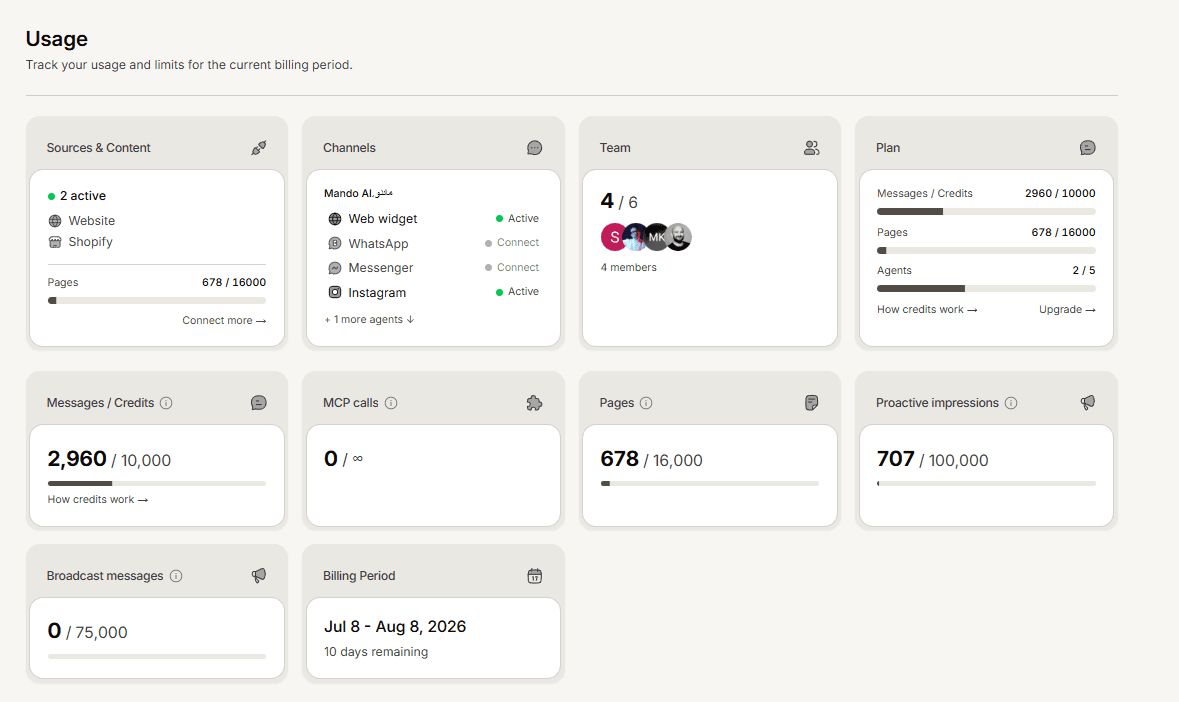
The Usage page shows what your workspace has consumed against what your plan includes. It is the page to check before deciding whether to upgrade.
What it shows
Message credits used this month, against your allowance
When the count resets
Pages of content used against your limit
A breakdown of where your usage came from
Reading it well
Two numbers move differently and it is worth not confusing them.
Message credits reset every month, so this figure starts at zero again and tells you about your current pace.
Pages do not reset. That figure is the total amount of content in your library right now, so it only falls when you delete something.
Using it to decide
Check it a week into your month. If you have used well over a quarter of your credits, you are on course to run out, and it is cheaper to decide now than after your agent has stopped replying to customers.
If one app or agent accounts for most of your usage, that is also where any improvement will pay off most.
If you are close to a limit
For message credits, buy the extra messages add-on or move to a larger plan.
For pages, deleting content you no longer need frees space immediately and costs nothing, which is often the better first move.
Frequently asked questions
Who can see the Usage page?
It sits alongside your other organisation settings. Billing changes are limited to Super Admins.
Why does my reset date look unusual?
On a paid plan the month runs from the day your subscription started, not the first of the calendar month.
The numbers look out of date.
Reload the page. Usage figures are cached briefly.