
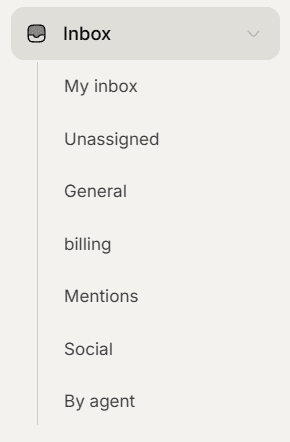
Views sit in the left navigation under Inbox. Where the status tabs answer what state a conversation is in, views answer whose it is.
The views
Inbox, the parent row itself, is the broad queue. It shows everything you have access to rather than a filtered slice.
My inbox shows conversations assigned to you. This is your personal work.
Unassigned shows conversations nobody has claimed. It is the pile to pull from when you have capacity.
Mentions shows conversations where a colleague mentioned you.
Teams appear as their own rows if your workspace uses them, and Super Admins also get a By agent option for looking at one person queue.
Mentions works differently
Mentions is the one view that ignores the usual scoping. If a colleague mentions you on a conversation you would not otherwise see, being mentioned is itself what gives you access to it.
That is the point of mentioning someone: it pulls them in rather than only notifying them.
Views and tabs combine
A view and a status tab work together. My inbox plus Needs reply is the most useful combination in the product: it is your work, waiting on you, and nothing else.
Picking a team clears the current view and vice versa, since they answer the same question in different ways.
Snoozed conversations
A conversation snoozed until a future time is hidden from every view until that time passes, so a quiet inbox may not be an empty one.
Mentions is the exception again, and shows mentioned conversations whether snoozed or not.
Frequently asked questions
Why is my inbox empty?
If you are a Member with no team and nothing assigned to you, the broad view has nothing to show. Try Unassigned.
Is there an All view?
The parent Inbox row is the broad queue. There is no separate All row.
Can I see another agent queue?
Super Admins can, using the by agent option.